Key takeaways
- Price Trends: PC component prices are unlikely to drop before 2027 due to the demand for AI data centres.
- Smart Budgeting: In this Price Hike, you can still build a reliable gaming & productivity PC under 1 Lakh in 2026 by making smart choices with minimum performance compromises.
- RAM Strategy:16GB of Single stick RAM is not as bad as you think currently, compared to 16x2 (32GB) for Budget to Midrange PC builds.
- Gaming Focus: Choose AMD CPUs and GPUs for pure gaming performance on a budget.
- Productivity Focus: Opt for Intel CPUs and Nvidia GPUs for editing and rendering, thanks to Quick Sync technology.
- Gaming Performance: This budget comfortably supports 1080p gaming at high settings and 2K gaming with DLSS Quality/Performance modes.
- Workstation Capability: You can still assemble a reliable 4K video editing PC in this Budget.
- Should you build right now?: With hardware prices trending upward through 2026, "waiting for a Price drop" is a losing strategy. If your livelihood depends on your PC, building your PC today is a smart choice to avoid the inevitable price hikes coming later this year.
PC Building Market Scenario (Q2 2026)
If you're waiting for memory and storage prices to dip, you might be waiting a while. We don't anticipate any significant relief until at least 2027, as manufacturers continue to pour their resources into AI-focused HBM technology—the current primary driver of industry growth.
CPU prices are expected to rise by 15% in the coming months. Ongoing turmoil in the Middle East will also drive up costs due to a helium shortage, which is a critical resource for semiconductor cooling and manufacturing.
All signs suggest that the AI bubble is not going to pop anytime soon. For many, the hope is that the market stabilises sooner than expected so that PC gaming and professional builds become affordable again. Interestingly, GeForce Now has just launched in India during this period of high hardware costs. It raises a vital question: Is cloud gaming the future? similar to streaming movies on OTT platforms? While we welcome these advancements, owning a PC should remain accessible to everyone, allowing users to be self-sustainable and have full control over their hardware.
PC build under 1 Lakh still possible in 2026?
The short answer is yes, you can still build a reliable gaming/workstation PC under 1 lakh in this market situation. Our 1 lakh build is achieved through some smart tweaks here and there to maximise price-to-performance for both gaming and workstation use without sacrificing performance in the long run.
Quick Note
- Pricing: Prices mentioned for the components are not constant and are subject to change, greater or lower,r depending on the market fluctuations. Visit our website's shop section to stay up to date with current prices of the listed components, or call or WhatsApp us to get the best prices.
- Tested & Verified: The components we suggest have been thoroughly tested and verified through numerous builds. We select parts based on years of industry experience and data, prioritising low RMA rates and reliable brand support.
- Customisation: Feel free to swap these components for similar specifications and pricing of your choice and taste
Build 1: The Gaming/All-Purpose PC build
| Component | Name | Estimated Price |
| CPU | AMD Ryzen 5 7500F | ₹15,300 |
| Motherboard | MSI B650M Gaming WIFI M-ATX Motherboard | ₹10,300 |
| Cooler | Stock Cooler | |
| RAM | G.Skill RipJaws S5 16GB 6000MHz CL36 DDR5 RAM | ₹20,000 |
| SSD | Crucial P310 500GB Gen4 NVME | ₹9,400 |
| GPU | ZOTAC Gaming GeForce RTX 5060 | ₹37,000 |
| PSU | Deep cool PL550D ATX 3.1 | ₹3,700 |
| Cabinet | Cougar MX600 Mini V2 - Black | ₹4,300 |
| TOTAL | ₹100,000 approx. (with GST) |
Why Choose these components & Alternatives
CPU: Ryzen 5 7500F
- Best entry-level CPU for the AM5 Socket, which has 6 Cores and 12 Threads. If you want something powerful that is both better in gaming and productivity, you can go with Intel 250K plus (Yet to release,e but benchmarks are out).
- In AMD, you have the 9600X, which costs roughly 45% more and provides 10–15% faster single-core performance than the 750F.0F, With the arrival of Intel 250K Plus, we can expect a price drop on the 99600X. Furthermore, we consider 7500F as the best value for money in 2026’s current pricing and scenario.
Motherboard: MSI B650M Gaming WIFI M-ATX Motherboard
- One of the best “entry-level” motherboards for the AM5 socket and Ryzen 7000/9000 series CPUs, while it can tech support high-end CPUs on paper, we don’t recommend pairing it with flagship CPUs like 7950X, 7950X3D, and 9950X.
- Being in the AM5 socket, it has a good upgrade path compared to the Intel 1851 socket, but with the release of Intel 250/270K plus CPUs (Arrow Lake Refresh), Intel prolonged the 1851 socket lifespan, but Intel is expected to move to a new socket, LGA 1954, leaving 1851 a dead socket.
- Despite being a "budget motherboard", it includes Wi-Fi 6E and 2.5G LAN, which are standard on much more expensive boards.
- It also includes a Flash BIOS Button on the rear IO, which is a lifesaver for building with newer CPUs (Ryzen 9000 series) that might require a firmware update before the first boot.
- Despite having only 2 DIMM slots for RAM, it makes perfect sense for the current PC market economy, as more and more of the latest entry-level motherboards are released with only 2 DIMM slots due to high RAM prices.
- Consider the MSI Pro B850M-G M-ATX Motherboard for more futureproofing, and it has PCIe 5 slots for both GPU and Storage,e but it doesn't have WIFI support built i.n
RAM : G.Skill RipJaws S5 16GB 6000MHz CL36 DDR5 RAM
- With the current market scenario, it is better to go with RAMs that cost less and are available. It is recommended to go with a single stick of 16GB memory and upgrade later when prices are back to normal.
- It is still a viable choice to go for 16GB of RAM for now, and it can play most games fairly well. You won't lose any performance on GPU-intensive games, but you will notice 1% lows to be lower compared to dual-channel memory. The decrease in 1% lows will not affect your immersion in games because they will be well above 60FPS. In short, games that are CPU intensive relies more on your Memory(RAM) and GPU-intensive games won’t rely much on your RAM, there's no performance loss if you run a single stick of memory.
Note before upgrading:-
- When upgrading, if you mix sticks with different rated speeds, your motherboard is forced to run both sticks at the speed of the slower stick.
- You will likely encounter system crashes, random reboots, or blue screens if you try to enable XMP or EXPO to reach high advertised speeds (like 6000MHz).
- You can solve these issues by tweaking some settings in RAM Profile/EXP, O or leave it to experts like us to deal with it.
- Aim for at least 5600 MHz or 6000 MHz, which is a sweet spot for modern AMD and Intel systems.
*Pro Tip - if you have a reliable friend or family member who wants to build/upgrade his PC, get a kit (ex:2x16GB) instead of a single stick and split it, so that in the future you can get the extra RAM from your friend or vice versa to perfectly match your RAM speeds and timings to enable PBO to run at advertised speeds (ex: 6000Mhz), this is more of a practical and futureproof solution for the RAM shortage.
SSD : Crucial P310 500GB Gen4 NVME
- Again, same with SSD, whatever is available and costs less, just go with it, make sure the specifications are similar to the ones we mentioned, Gigabyte 4000E 500GB NVMe is another option you can go for, which has TLC technology (better than QLC used in Crucial P310), but Crucial wins in other aspects like Read speed.
- If you have the budget, go for a 1TB Gen 4 SSD like Corsair MP600 Elite, because modern AAA games are getting larger in size (200GB+), and with GTA 6 releasing, it will be more than 250GB.
GPU: ZOTAC Gaming GeForce RTX 5060
- You could go with RX 9060 XT(8GB) if your only purpose is gaming, which costs less than 5060 by ₹5000, They both offer similar gaming performance but NVIDIA is better on the software side like DLSS, Raytracing and offers better support and productivity performance due to CUDA, while AMD is closing the gap with FSR 4/4.1, it is still not better than DLSS 4/4.5.
- Recently, AMD has been getting huge backlash for not supporting FSR 4 technology for previous generation cards like 7900XTX, etc., while NVIDIA continues to support their older cards consistently. We hope AMD listens to the feedback and releases the INT 8 version of FSR 4 for older cards soon.
- So in short, if u want an All-Rounder GPU, go for RTX 5060 (8GB) and go for 9060XT if your goal is pure price-to-performance rasterised gaming.
PSU: Deep cool PL550D ATX 3.1
- One of the Parts in the PC that you should not compromise is the PSU because when it fails, it can send a high-voltage surge straight to your motherboard, frying every connected component in an instant.
- Always look for PSUs from reputable brands that carry a verified 80 Plus or Cybernetics efficiency rating. We went with Deepcool because it is good for the price and has ATX 3.1 support
*Tip - If you are planning to upgrade your GPU later, going with an 850W PSU is a smart choice, like DeepCool Gamer Storm PN850D Gold ATX 3.1
Cabinet : Cougar MX600 Mini V2 - Black
- Choosing an M-ATX cabinet for an M-ATX motherboard is always a better choice in terms of looks. You can still go with ATX Cabinets if u plan a huge upgrade down the line for your PC, but an ATX case on an M-ATX motherboard looks “off” in our opinion.
- Cabinet is always a personal choice in the computer community; feel free to choose the cabinet of your choice. Keep your budget for a cabinet under ₹5K to 6K,
Recently, the Cougar brand has been killing it in the Indian market with their unique PC cases, so we went with them.
“Cougar is not a new brand, they were in a tie-up with Gigabyte before and re-entered the indian market recently with products ranging from pc cases to AIOs (our favourite)”
WHAT CAN WE EXPECT FROM THIS PC?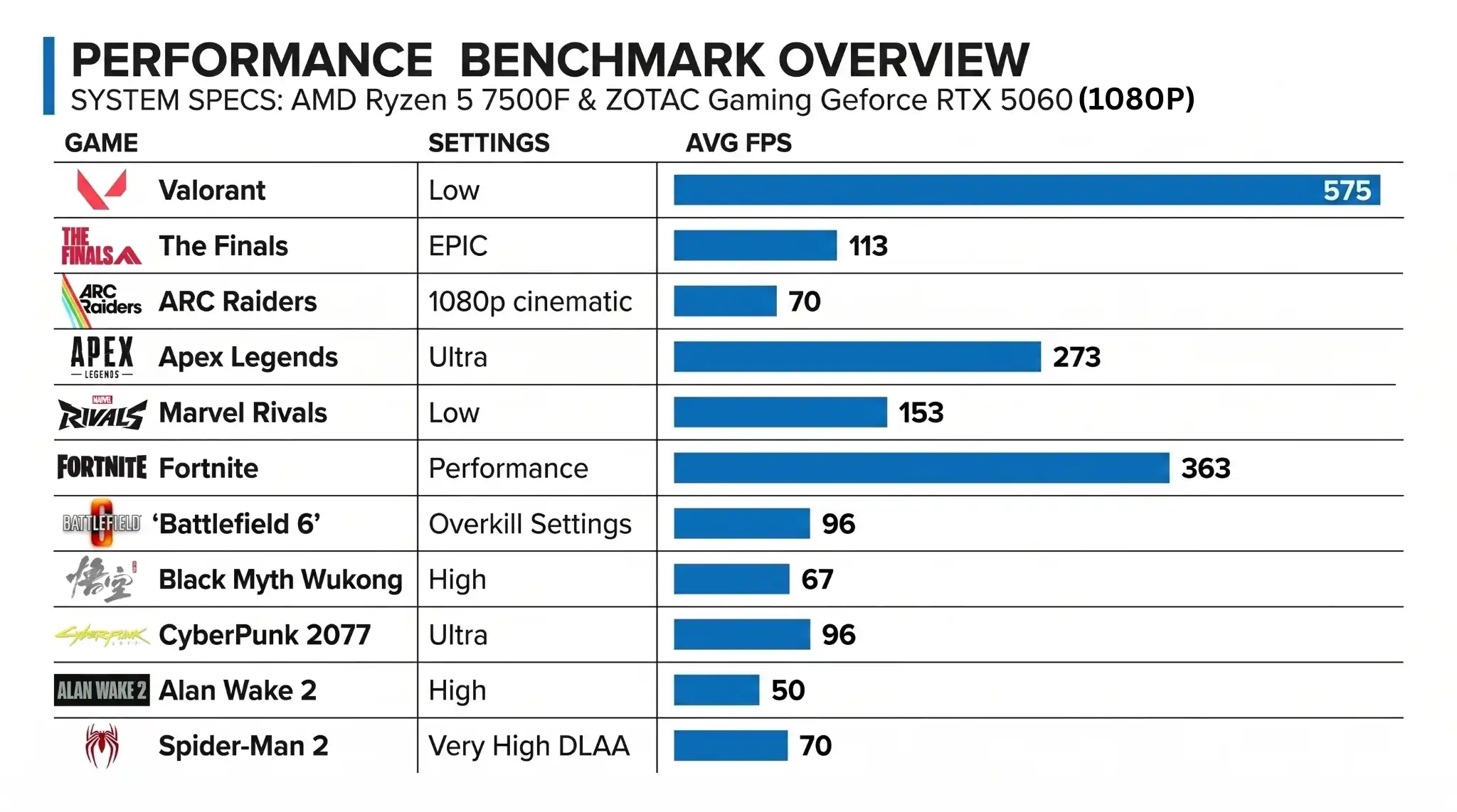
Build 2: The Editing PC build
| Component | Name | Approx Price |
| CPU | Intel Core Ultra 5 225 | ₹16,650 |
| Cooler | Stock Cooler | |
| Motherboard | Gigabyte H810M H M-ATX | ₹8,400 |
| RAM | G.Skill RipJaws S5 16GB 6000MHz CL36 DDR5 RAM | ₹20,000 |
| SSD | WD Blue SN5100 1TB PCIe Gen4 NVMe | ₹18,800 |
| GPU | ZOTAC Gaming Geforce RTX 5060 | ₹37,000 |
| PSU | Deepcool PL550D ATX 3.1 | ₹3,700 |
| Case | Cougar MX600 Mini V2 - Black | ₹4,300 |
| TOTAL | ₹108,850 approx. (with GST) |
Gaming Vs Editing PC
We can build a good 4k editing PC by changing some parts from the gaming PC.
When it comes to professional editing, Intel CPUs perform better than AMD due to Intel's Quick Sync technology (hardware), which significantly increases video encoding, decoding, and transcoding, leading to smoother timeline scrubbing & faster rendering in apps like Premiere Pro and DaVinci Resolve. For this build, you can also choose Intel’s 250K Plus, as we mentioned before, it is compatible with Intel’s 1851 Motherboards and expected to have a lower price with increased performance compared to 9600X, but we will have to wait for the Indian prices, as they are different from the US market.
Storage:
Apart from a 1TB SSD, which can be used for software and cache, we recommend adding a high-speed 1TB Hard Drive to store your footage. This setup is good for 1080p edits, but when editing 4k footage, this fills up fast.
Watch the Full Video here.
Recently, we built 8 gaming pc's under a Strict Budget of 1 Lakh for a gaming cafe in Anna Nagar, Chennai called Midgard. These systems are an upgrade to the already 10 systems we gave them 5 months earlier.
PC Build with Intel 250K Plus under ₹1.2 Lakhs
Conclusion
If you are planning to build a PC in 2026, now is your chance to do it, with conflicts in Middle East the prices are likely to go up even more and there is CPU price hike around the corner according to reports and many more evidences points to no price drop until 2027 - so the best time to build a PC is right now, if you are still confused about what parts to choose and want a hassle free experience, we are here to help you - Call or WhatsApp: +91 97997 69699 or fill the form and our team will contact you very soon, upon confirmation you can schedule a live build session for your build.